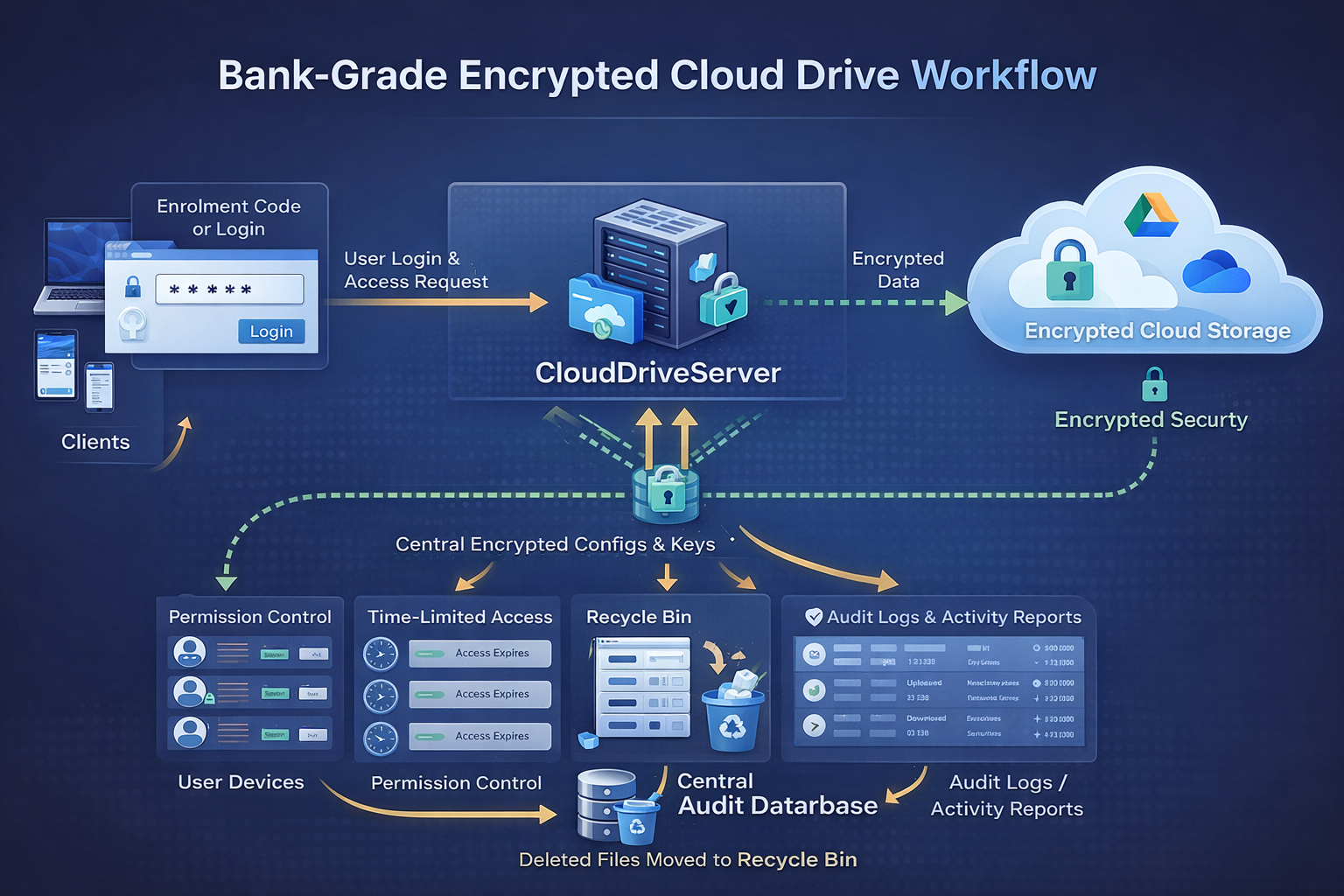
Powered by rclone Crypt Remote
Modern businesses face growing pressure to protect data, control access, and maintain detailed audit trails—whether data lives on-prem, in the cloud, or both. A centralized encrypted NAS / cloud drive architecture using rclone crypt remote provides a practical, compliance-ready solution without sacrificing usability or performance.
This model combines end-to-end encryption, centralized configuration, and strict access governance, making it ideal for regulated environments and security-conscious organizations.
Why Centralized Encrypted Storage Matters
Traditional cloud drives and NAS solutions often rely on:
- Provider-side encryption
- Local configuration files stored on endpoints
- Shared credentials
- Limited auditing and deletion controls
These gaps introduce compliance risk.
A centralized encrypted drive architecture ensures:
- Data is encrypted before it ever reaches the cloud
- Credentials and configurations are never exposed to end users
- Access is tightly controlled, logged, and time-limited
- Accidental or malicious deletions are reversible
Core Architecture Overview
1. End-to-End Encryption with rclone Crypt
At the heart of the system is rclone crypt remote, which provides:
- Client-side encryption
- Encrypted filenames and directory names
- Encrypted file contents
- Zero knowledge for cloud providers
Anyone accessing the underlying cloud storage (Google Drive, OneDrive, S3, etc.) sees only encrypted data, even administrators of the cloud platform.
2. Centralized Configuration & Key Management
Unlike traditional rclone setups where:
rclone.conflives on user machines- API keys and passwords may exist in plaintext or retrievable stores
This architecture stores all rclone configurations and encryption secrets:
- Fully encrypted
- On a dedicated secure server
- Never permanently stored on client devices
Clients fetch their configuration securely at runtime, enabling:
- Faster recovery and uptime
- Central rotation of keys
- Immediate access revocation without touching endpoints
3. Controlled User Access & Time-Limited Sessions
Each employee or client:
- Uses their own login
- Receives permission-scoped access (read, write, folder-level control)
- Can be assigned time-limited sessions or expiration dates
Access can be revoked instantly without re-encrypting data or reconfiguring the cloud provider.
4. Simple User Enrollment
New user onboarding does not require:
- Manual config file creation
- Sharing encryption passwords
- IT intervention on every device
Instead, new users can register using a single enrollment code, which:
- Authenticates the user
- Fetches the correct encrypted configuration
- Applies predefined access policies automatically
This drastically reduces onboarding time while maintaining security.
5. Full Activity Auditing & Compliance Logging
Every action is recorded in a central audit database, including:
- File uploads
- Downloads
- Modifications
- Renames
- Deletions
- Login and access attempts
These logs support:
- SOC 2
- ISO 27001
- HIPAA
- GDPR
- Internal compliance and legal discovery
6. Deletion Protection with Recycle Bin Enforcement
Accidental or malicious deletions are one of the most common causes of data loss.
This system enforces soft deletion:
- Files are moved to a protected recycle bin
- Permanent deletion requires elevated permissions or retention expiration
- Recovery is fast and auditable
This adds a critical safety layer missing from many cloud-only solutions.
Security & Compliance Benefits
| Feature | Compliance Benefit |
|---|---|
| Client-side encryption | Data remains private even from cloud providers |
| Centralized key storage | No credential leakage on endpoints |
| Per-user access control | Least-privilege enforcement |
| Time-limited access | Reduced risk from dormant accounts |
| Full audit logs | Regulatory and legal readiness |
| Deletion protection | Data retention & ransomware resilience |
Why This Is Essential for Modern Businesses
A centralized encrypted cloud/NAS drive is no longer optional for businesses that:
- Handle sensitive or regulated data
- Support remote or hybrid workforces
- Need provable security controls
- Want to avoid vendor lock-in
By combining rclone crypt, centralized configuration, and strict access governance, organizations gain:
- Enterprise-grade security
- Cloud flexibility
- Simplified management
- Strong compliance posture
Conclusion
A centralized encrypted NAS and cloud drive architecture using rclone crypt remote delivers true end-to-end encryption, centralized control, and enterprise-level auditing—without sacrificing ease of use.
For businesses serious about data protection and compliance, this approach provides a secure foundation that scales with both users and regulatory requirements.